
Home screen

Note: The sample image is for PC (demo version is 1.0.29.395)​

1. Toolbar, from left to right:​

2. Switch: used to open/disconnect​

3. System proxy switch (PC only)​

4. Rule mode: Rule/Global​

  • Note: Rules/Global refers to the rules for traffic flowing out of the proxy software (outbound)
  • Rule: distribute traffic according to the diversion rules
  • Global: all traffic is forwarded/proxyed through current selection

5. The name of the configuration actually used in current selection​

6. The traffic information of the configuration actually used in current selection (if the configuration is not supported, it will not be displayed), from left to right:​

  • Upload traffic
  • Download traffic
  • Traffic package
  • Traffic package expiration time
  • Traffic information refresh button: refresh traffic information, will not re-download configuration
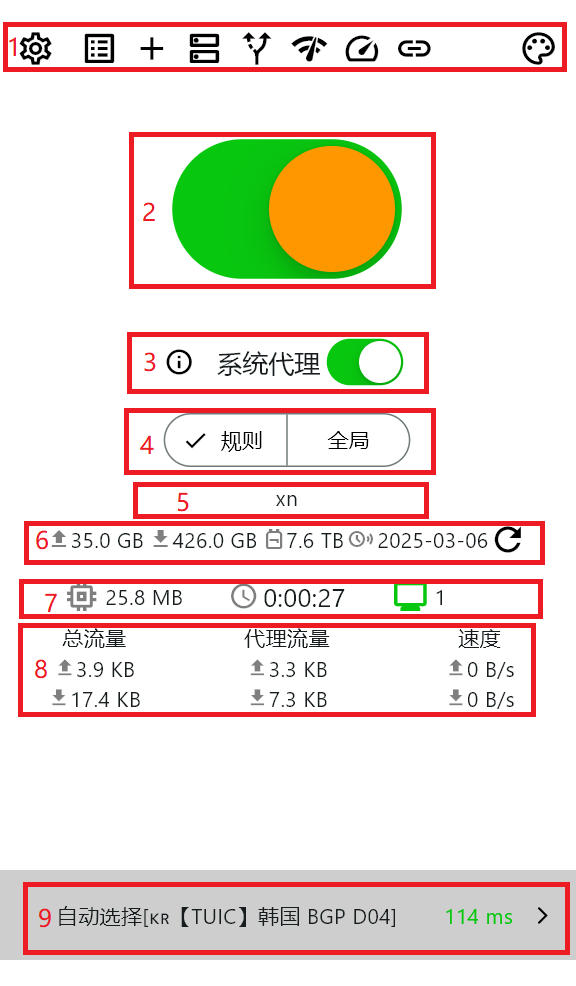
7. Operation information, from left to right:​

  • Memory usage
  • Run time
  • Inbound Number of connections: click to view specific inbound connection information

8. Operation information, from left to right:​

  • Total traffic: upload/download
  • Proxy traffic: upload/download
  • Current speed: upload/download

9. Current selection, type can be:​